Marketing
Email automation: The ultimate guide for marketers and senders

Email marketing, despite her age, still remains one of the most effective tools for businesses to engage an audience, drive sales, and build long-term relationships. However, she does have a caveat – managing campaigns manually can quickly become overwhelming, especially as smaller businesses scale and their subscriber lists grow.
This is where email automation comes in.
Email automation enables us to send the right message, to the right person, at the right time (without massive amounts of heavy lifting). Think of it as personalization at scale – where marketers create workflows that trigger emails based on subscriber behavior or other predefined conditions.
In this comprehensive guide, we’ll explore what email automation is, its benefits, different types of automated emails, and when to use them. We’ll also provide a step-by-step breakdown of how to set up an automated workflow with Mailjet’s updated automation feature, specifically designed to help you build smarter, more effective campaigns.
What is email automation?
Email automation is the process of sending predefined emails to subscribers when they meet certain criteria. Unlike traditional email campaigns, which require manual scheduling and sending, automated emails run in the background – ensuring that each recipient gets the right message at the right time.
How email automation works
At its core, email automation relies on three main components:
- Triggers – These are specific actions or conditions that start an automated email sequence. Examples include:
- A new user signing up for a newsletter.
- A customer abandoning their shopping cart.
- A subscriber not engaging with emails for a set period.
- Workflows – These are predefined email sequences that guide a user through a journey. For instance, a welcome series might start with an introductory email, followed by a special offer, then a product recommendation.
- Segmentation – Instead of blasting emails to an entire list, automation allows businesses to personalize messaging based on user behavior, demographics, or purchase history.
For example, an e-commerce store can send an automated email to shoppers who added items to their cart but didn’t complete checkout, whereas a SaaS company could trigger onboarding emails for new customers, guiding them through product setup.
Automation is about working smarter – ensuring that businesses stay engaged with their audience without needing constant manual intervention.
The benefits of email automation
Email automation has transformed the way we communicate with our audiences, providing a seamless and scalable way to engage customers without the constant need for manual input. However, the advantages go beyond just time saving – automation enhances personalization, increases efficiency, and drives better results across the entire marketing funnel. Here’s an in-depth look at the key benefits that email automation offers.
Saves time and boosts efficiency
One of the obvious advantages of email automation is that it eliminates the amount of repetitive, manual tasks. Typically, email marketers have to create, schedule, and send emails individually, which quickly becomes overwhelming as subscriber lists grow. With automation, that all changes. Businesses can create workflows once and let them run in the background, meaning emails are sent at the right time, without requiring human intervention.
This allows marketing teams to shift their focus from operational tasks to more strategic efforts, such as refining content, analyzing data, and improving overall campaign performance.
A good example is welcome emails. Instead of manually sending an individual email to each new subscriber, businesses can set up an automated welcome series that triggers as soon as someone signs up. Not only does it save time, but ensures each new subscriber receives a consistent onboarding experience.
Personalization at scale
Consumers today expect personalized experiences from the brands they interact with. That’s fine, when you’re dealing with a handful of clients at a time. But what about as the business expands? It becomes nigh-on impossible to maintain that level of intimacy with clients. What email automation does is make personalization possible at scale.
Instead of sending generic mass emails, businesses can tailor messages based on subscriber behavior, preferences, and past interactions. This level of personalization leads to higher engagement and ultimately, stronger customer relationships.
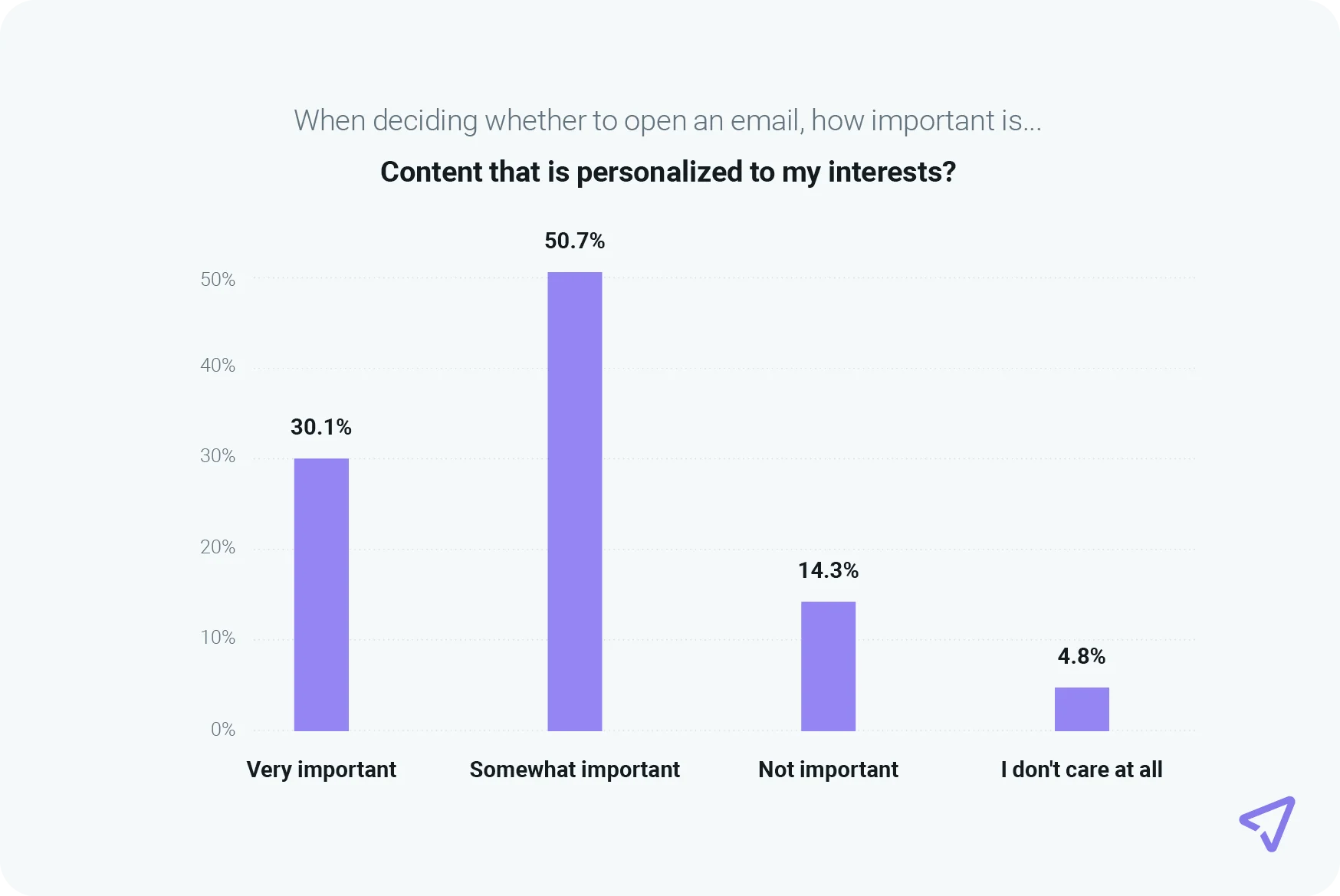
A combined 80.8% of survey respondents in Mailjet’s The path to email engagement report said personalized email content is important when deciding whether to open an email.
Automated emails typically include dynamic content, such as a recipient’s name, product recommendations based on browsing history, or customized offers based on past purchases. For instance, an e-commerce company might send a personalized discount code to a customer who has browsed a particular product category multiple times but hasn’t yet made a purchase. This type of targeted messaging resonates more with the recipient, increasing the likelihood they return and finally purchase said item.
Beyond product recommendations, email automation enables brands to engage customers with behavior-triggered emails, such as re-engagement campaigns for inactive subscribers. If a user hasn’t opened an email or made a purchase in several months, an automated email can be sent to remind them of the brand’s offerings, showcase new products, or provide a special discount to encourage them to return. These re-engagement efforts help businesses maintain an active and engaged subscriber list while reducing churn.
Personalization within email is an absolute win-win. It delivers a much-enhanced customer experience. Great. But for business, it drives both higher email engagement and revenues. Test it for yourself to see.
Improves customer lifecycle management
Every customer embarks on a journey when they interact with your brand. First, they learn about the brand – what it is you do, you stand for, and ultimately, sell. Then, they decide if they want to buy something. If that all goes well, after making a purchase they likely need help using the product.
Businesses that stay in touch with customers at each step of this journey are more likely to build strong relationships and keep customers coming back.
Email automation makes this process much easier. Instead of having to manually send emails to each individual customer, businesses can set up automatic emails that guide customers through their journey, giving them the right information and support when and where they need it.
For instance, a SaaS company can use automated email sequences to onboard new users, gradually introducing them to key features, best practices, and educational content to help them get the most out of the platform. As customers progress through their subscription, additional automated emails can provide feature updates, case studies, and renewal reminders to keep them engaged and prevent churn.
Ensures consistent, timely communication
Manually managing email campaigns can lead to inconsistencies in messaging and timing, especially for businesses with large email lists or frequent communications. Some customers might receive emails too late, while others might not receive important updates at all…
Email automation ensures that all subscribers receive timely and relevant content exactly when they need it, without any delays or gaps in communication. A good example would be a travel company automating booking confirmation emails for customers who have made reservations. We all know how stressful airports can be and the last thing we need is an undelivered email with the travel itinerary and tickets…
This way, it ensures travelers receive crucial information at the right time, improving their overall experience with brand and reducing the risk of missing their flight!
Enables smarter segmentation and targeting
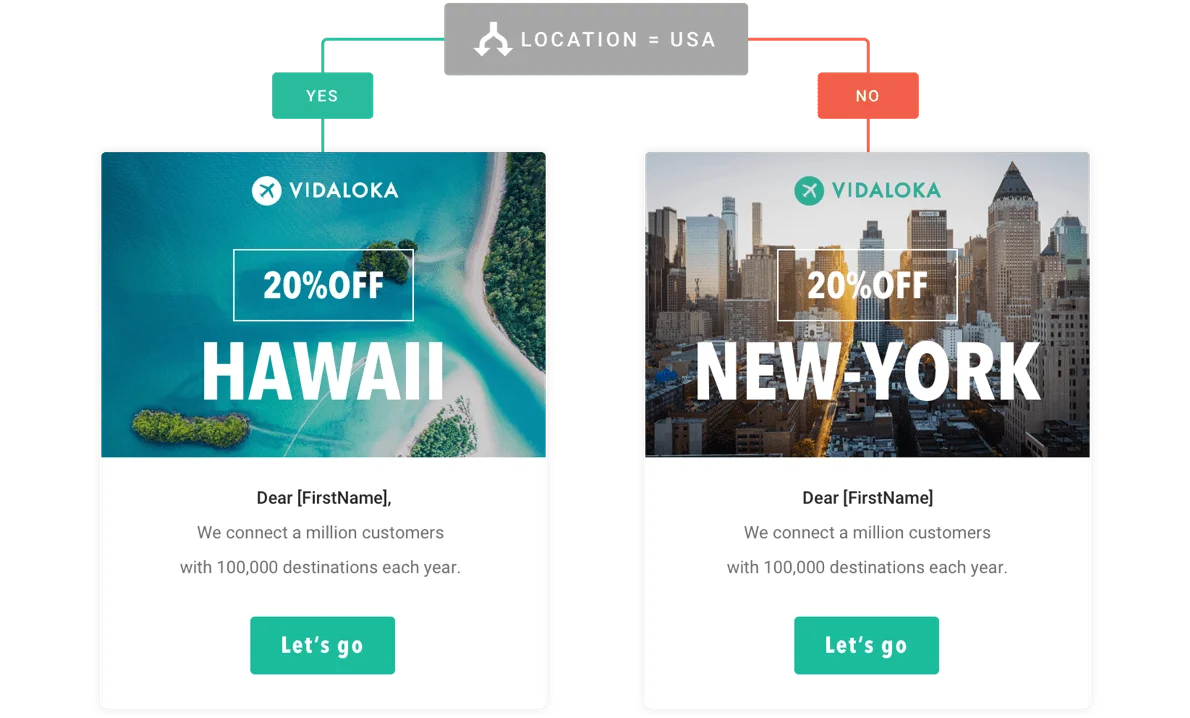
Not all customers are the same, right? So, it would make sense to tailor communications to their specific needs. Email automation allows businesses to segment their audience into more precise groups based on various factors such as demographics, purchase history, engagement levels, and more. This segmentation ensures that subscribers receive content that is most relevant to them, increasing the effectiveness of the campaign.
For instance, a fashion retailer might segment its email list into customers who prefer men’s apparel and those who prefer women’s apparel. By sending gender-specific product recommendations, the retailer ensures that each subscriber receives content tailored to their interests.
Segmentation can also be used for engagement-based targeting. A business can separate highly engaged subscribers from inactive ones, sending different types of emails to each group. Active subscribers might receive exclusive VIP offers, while inactive users could receive a re-engagement email with a personalized discount.
Different types of email automation
Email automation can be applied in various ways, depending on the goals of a marketing campaign. Below you’ll find some of the most common email automation examples:
|
Email automation example |
Description |
|---|---|
|
Welcome email |
Triggered when a new subscriber joins an email list. These emails introduce the brand, set expectations, and often include an incentive to encourage engagement. |
|
Abandoned cart |
When a potential customer leaves a website without completing a purchase, an automated email can remind them of the items they viewed and encourage them to complete the transaction. |
|
Re-engagement campaign |
Designed to win back inactive subscribers. If a contact hasn’t opened or clicked an email in a while, an automated sequence can remind them of the brand’s value and offer a special promotion to spark renewed interest. |
|
Post-purchase follow up |
Helps businesses maintain engagement even after a sale. These emails might include order confirmations, shipping updates, product recommendations, or requests for customer reviews. |
|
Milestone |
Personalized birthday and anniversary emails are another way to enhance customer relationships. Recognizing special occasions with exclusive offers or personalized messages makes subscribers feel valued and strengthens brand affinity. |
|
Transactional emails |
Transactional emails, such as order confirmations, password resets, and shipping notifications, are also a form of email automation. While primarily functional, these emails provide an opportunity to reinforce branding, cross-sell related products, or enhance the overall customer experience. |
|
Feedback request |
A feedback request workflow is a series of emails sent automatically to customers after they buy something or use a service, asking them to share their thoughts. These emails help businesses learn what customers like or what could be improved, making future experiences better. |
|
Onboarding |
A series typically sent by businesses to help new customers learn about their products or services. These emails are sent over a few days or weeks and include helpful tips, special offers, or step-by-step guides to make getting started easy. |
How to set up an email automation workflow
Setting up an email automation workflow may seem complicated at first, but with the right platform and planning, it’s much easier than it seems. The core steps are: define your audience, set clear goals, choose effective triggers, and use a tool that simplifies automation from end to end. There are even platforms like Albato which can help you connect your favorite apps and automate email workflows without writing a single line of code.
Step 1: Define your goal
Before you start creating an automated email sequence, you need to know what you want to achieve. Different automation workflows serve different purposes, so having a clear goal will help you design the right emails.
Some common goals include:
- Welcoming new subscribers and introducing them to your brand.
- Recovering abandoned carts and encouraging customers to complete their purchases.
- Following up after a sale to gather feedback or offer support.
- Re-engaging inactive subscribers who haven’t opened emails in a while.
- Nurturing leads with valuable content until they are ready to buy.
Once you have a goal in mind, you can move on to choosing the right tool to build your workflow.
Step 2: Choose an email automation tool
To create an automated email workflow, you need a reliable email marketing platform that offers automation features. Some platforms require complex coding, while others, like Mailjet, provide a drag-and-drop automation builder that’s simple and easy to use.
When selecting an email automation tool, look for:
- Easy-to-use workflow builders (like Mailjet’s automation tool).
- Customizable triggers and conditions to ensure emails are sent at the right time.
- Segmentation options to target specific audiences.
- Email templates to save time and maintain consistent branding.
- Analytics and reporting features to track your automation’s performance.
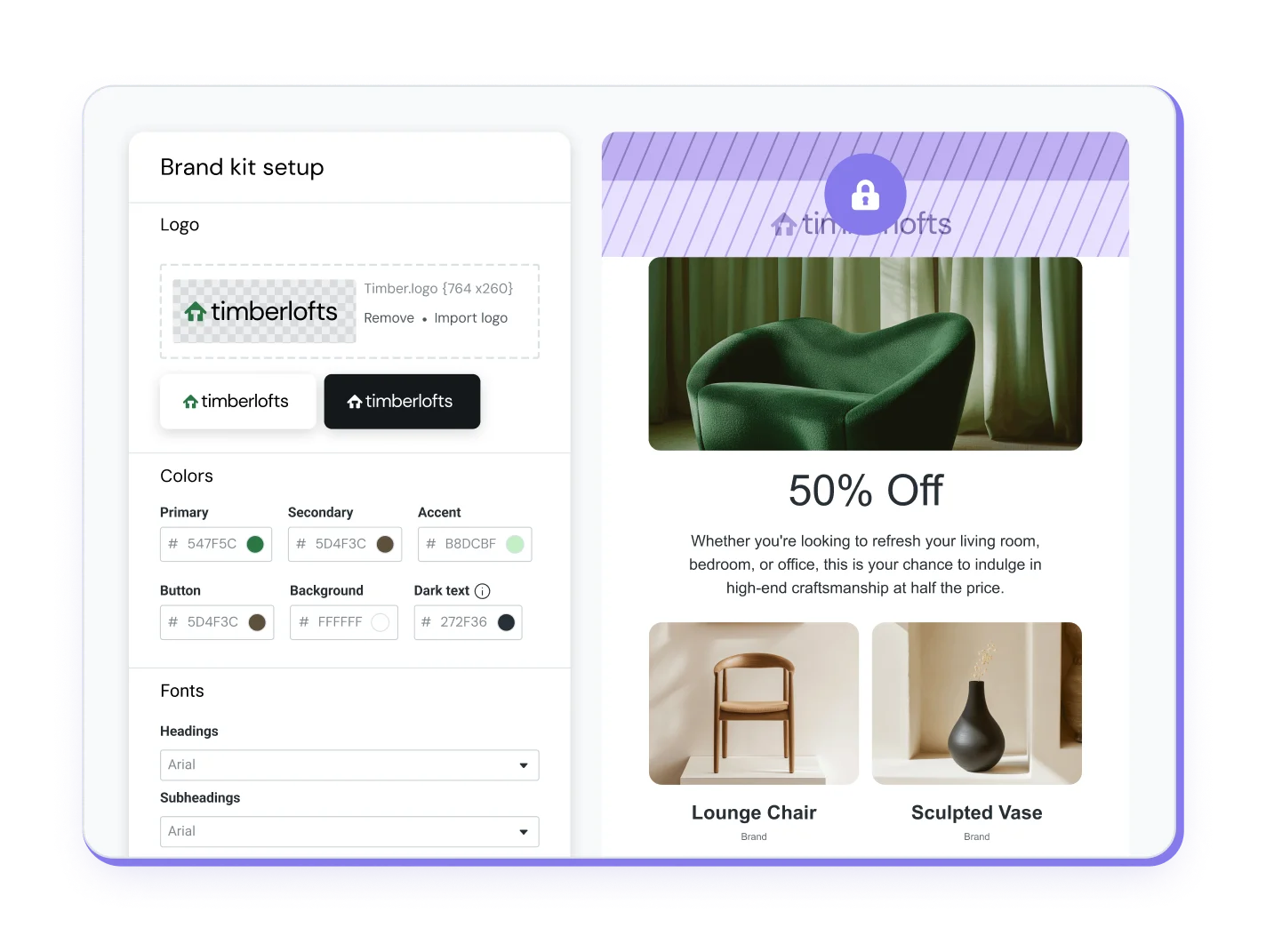
Mailjet’s drag-and-drop Email Editor can also automatically set your logo, fonts, and colors using your homepage URL, which applies your brand’s look and feel across all templates.
Step 3: Select a trigger for your workflow
A trigger is what starts the email workflow. When someone takes a specific action, it signals your automation tool to send the first email in the sequence.
Common triggers include:
- A new user signing up for your email list.
- A customer abandoning their shopping cart.
- A purchase being completed.
- A subscriber not opening emails for a certain period.
For example, if you’re creating a welcome email sequence, the trigger would be “when someone joins the email list.” In Mailjet, you can set up this trigger easily by choosing the New Contact Added option.
Step 4: Segment your audience for better personalization
Not all subscribers are the same, so sending one-size-fits-all emails isn’t an effective tactic. Email segmentation allows you to group subscribers based on different factors and send them the most relevant content.
With Mailjet’s segmentation feature, you can divide your audience based on:
- Behavior: Purchases, email open rates, or website visits.
- Demographics: Age, location, or industry.
- Engagement levels: Active vs. inactive subscribers.
If you run an online store, you can create separate workflows for first-time buyers and returning customers. First-time buyers might receive educational content about your products, while loyal customers might get exclusive loyalty discounts.
Step 5: Create and customize your email templates
Once you’ve defined your triggers and audience, it’s time to create the emails that will be sent in the automation workflow.
Instead of designing emails from scratch every time, you can use pre-made templates to keep your emails looking professional and consistent. Mailjet offers an easy-to-use drag-and-drop email editor, allowing you to create stunning, mobile-friendly emails without needing any design skills.

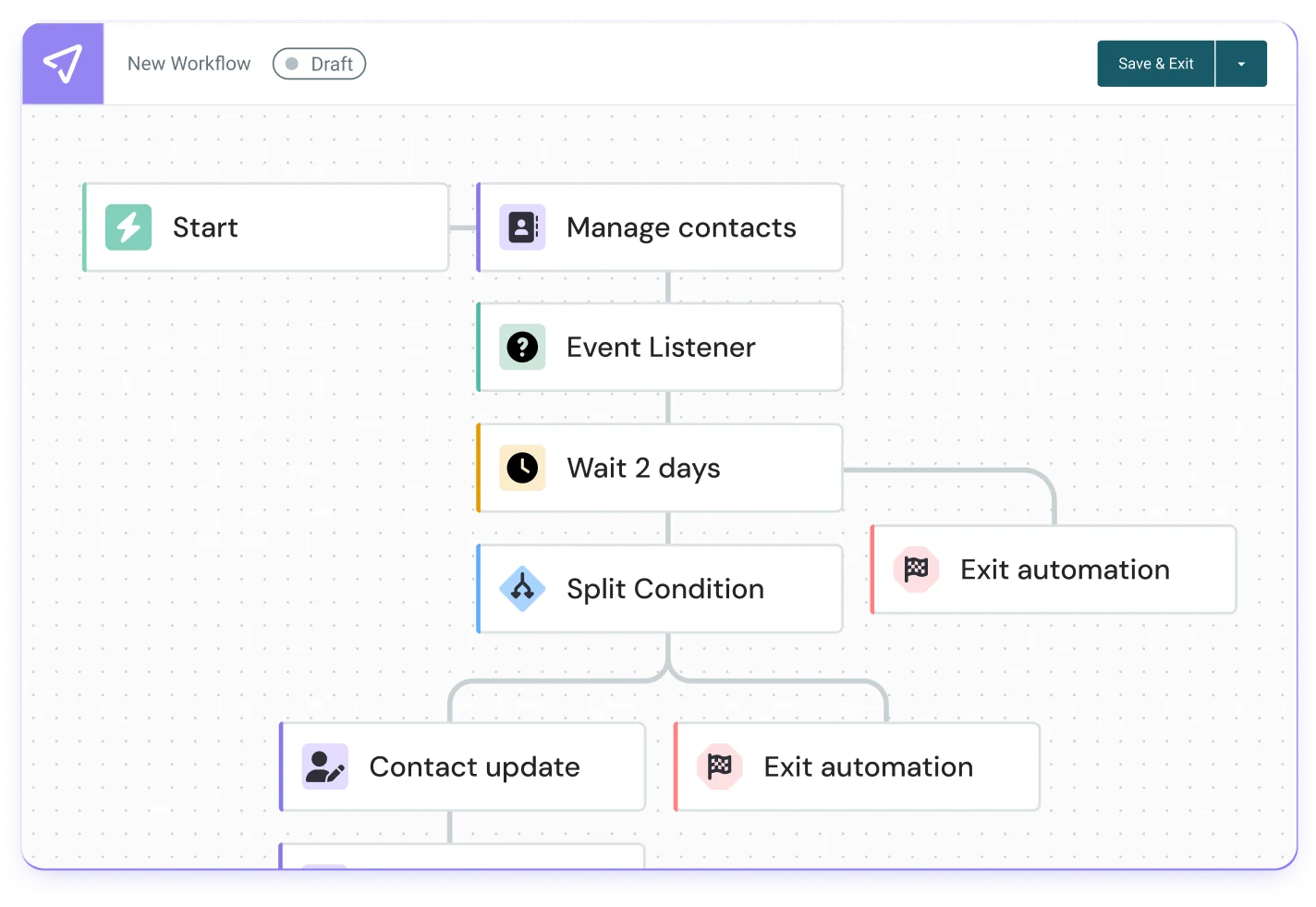
Step 6: Build the workflow with timing in mind
Now that your emails are ready, it’s time to decide when and how often they should be sent. Timing is crucial – sending too many emails too quickly can overwhelm subscribers, while waiting too long might cause them to lose interest.
Here’s an example of a welcome email sequence with proper timing:
- Immediate welcome email – Sent as soon as the user subscribes.
- Follow-up email (Day 2-3) – Introduces key products or services.
- Engagement email (Day 5-7) – Offers a special discount or content.
Step 7: Test and Optimize Your Automation Workflow
Before launching your email workflow, it’s important to test everything to make sure it works as expected. In Mailjet, you can preview emails, send test messages, and even run A/B tests to compare different subject lines or content styles.
After launching your automation, track key performance metrics such as open rates, click rates, and conversions. If your emails aren’t performing well, you can adjust your workflow by tweaking content or testing different send times. Mailjet’s real-time analytics help you optimize your automation over time for better results.
Email automation with Mailjet
Mailjet’s new automations experience hasimproved capabilities, making it easier for marketers to build sophisticated email workflows. The user-friendly drag-and-drop builder can now be used alongside a suite of customizable workflow blocks, including:
- Event
- Timer
- Action
- Condition
- Exit
This enables senders to design workflows that align with their specific marketing goals. Another key advantage of is the product’s scalability. Businesses can manage high-volume campaigns with ease, leveraging automation to streamline their email marketing efforts, gain real-time analytics for performance insights, and help marketers to improve overall engagement.
FAQ: Email automation
Below are some additional commonly asked questions to help you understand email automation and how to get the most out of it.
What is the main advantage of email automation?
Email automation saves time, ensures consistent communication, and allows for personalized engagement with subscribers at scale.
How does email automation improve customer engagement?
By sending relevant and timely emails based on user behavior, automation helps businesses maintain meaningful interactions with their audience.
What types of businesses benefit most from email automation?
Email automation is valuable for e-commerce, SaaS, media, and service-based businesses that rely on customer engagement and retention.
How does Mailjet’s automation feature differ from other tools?
Mailjet’s automation tool is designed for ease of use, offering a drag-and-drop workflow builder and advanced segmentation for targeted messaging.
Can Mailjet users create multi-step workflows?
Yes, Mailjet’s automation feature allows users to build multi-step workflows with conditions, timers, and actions for advanced email sequences.
Can I edit my automated workflows after they are live?
Yes, email automation isn’t a set-it-and-forget-it strategy. You should regularly monitor performance and adjust as needed. With Mailjet’s real-time editing feature, you can modify workflows, update content, or change triggers without disrupting your campaigns.
Can I use email automation for both marketing and transactional emails?
Yes! Marketing emails promote products and engage customers (like newsletters, discounts, or promotions), while transactional emails provide important updates (like order confirmations, password resets, and shipping notifications). Mailjet allows you to automate both types to keep communication consistent and professional.
How much does email automation cost?
The cost of email automation depends on the platform you choose and the number of emails you send. Mailjet offers a free plan, and its paid plans provide advanced automation features like segmentation, A/B testing, and real-time analytics. Premium users (15K+ plan and above) get access to Mailjet’s full automation suite.